Frequently Asked Questions
How do I install Ktisis?
Simple! You can use our Repo URL or the Sea of Stars URL in Dalamud's Experimental settings to add Ktisis to your plugins list. Sea of Stars' Repo URL is commonly included for other modding setups, so you may already have Ktisis available. Once there, you can install it like any main-repo plugin.
This is overwhelming! Where do I start?
If you're coming to Ktisis as a new user, welcome! This wiki is the perfect place to learn about what Ktisis can do - check out our guides for beginner and advanced tips, search for specific questions at the top of the page, or join our Discord server for any support that you can't find here.
If you're revisiting Ktisis after having used the v0.2 or Alpha version, check out our migration guide to find out everything that's changed and how you can tailor your experience.
Why can't I see any bones on my character?
Bone overlay visibility is disabled by default so you can see your character as they would appear for screenshots.
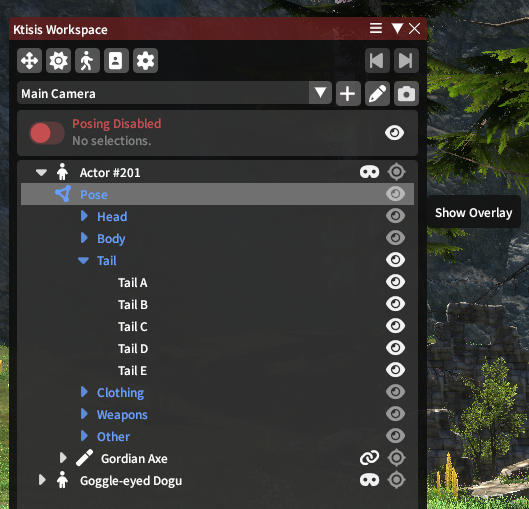 When you need to see bones to move them around in 3D space, use the Workspace's dropdowns on each actor to find and enable any (or all) parts of the skeleton.
You can also use default or custom Presets to toggle groups of bones on and off, found either by right-clicking specific actors or in the Object Editor. Learn more on the Overlay page.
Why is the main window so big? Can I resize it or pop-out the editors?
If your main window is labeled Ktisis Toolbar, you're using our alternate UI mode that consolidates the various subwindows into one auto-resizing window. This was developed for v0.2 users more comfortable with a consolidated and compressed UI - you can disable it from General settings to have each editor use its own window instead!
How do I play different emotes or animations?
The Actor Editor! In addition to changing your character's appearance, this is where you apply any combinations of emotes and expressions. You can also set specific cposes, sitting & lying down, and whether their weapon is drawn.
You can open this window from the top of the Workspace or Toolbar, or from any actor's right-click menu.
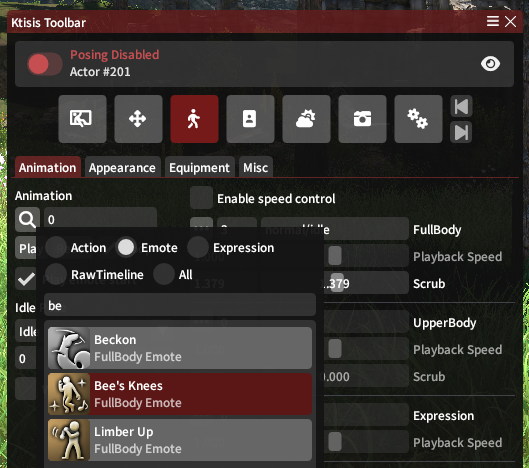
Searching for animations shown in the Toolbar UI.
Isn't there a testing version of Ktisis?
Not currently! Both Main and Testing builds of Ktisis are now synced up on v0.4 - in the future, we'll use our Testing branch for deploying experimental changes and fixes to a smaller group of users, so we recommend installing the main version if you're currently on the testing build.
Where do I send bug reports or feature requests?
You can raise any issues, suggestions, or get support from the devs & community in our Discord. We also accept new issues and PRs on GitHub if you're handy using it!